

Protect first
A single copy can vanish
Drives fail, folders get wiped, and working folders disappear. Valuable memories and files need more than one home.

Protect valuable data. Keep backups in sync. Preview every change.
Safely sync folders, keep Mac backups current, archive important files and Apple Photos, and review storage—all with a preview-first workflow that shows what will change before anything happens.
Works with
FileLever is available on macOS now. Windows and Linux builds are coming soon.
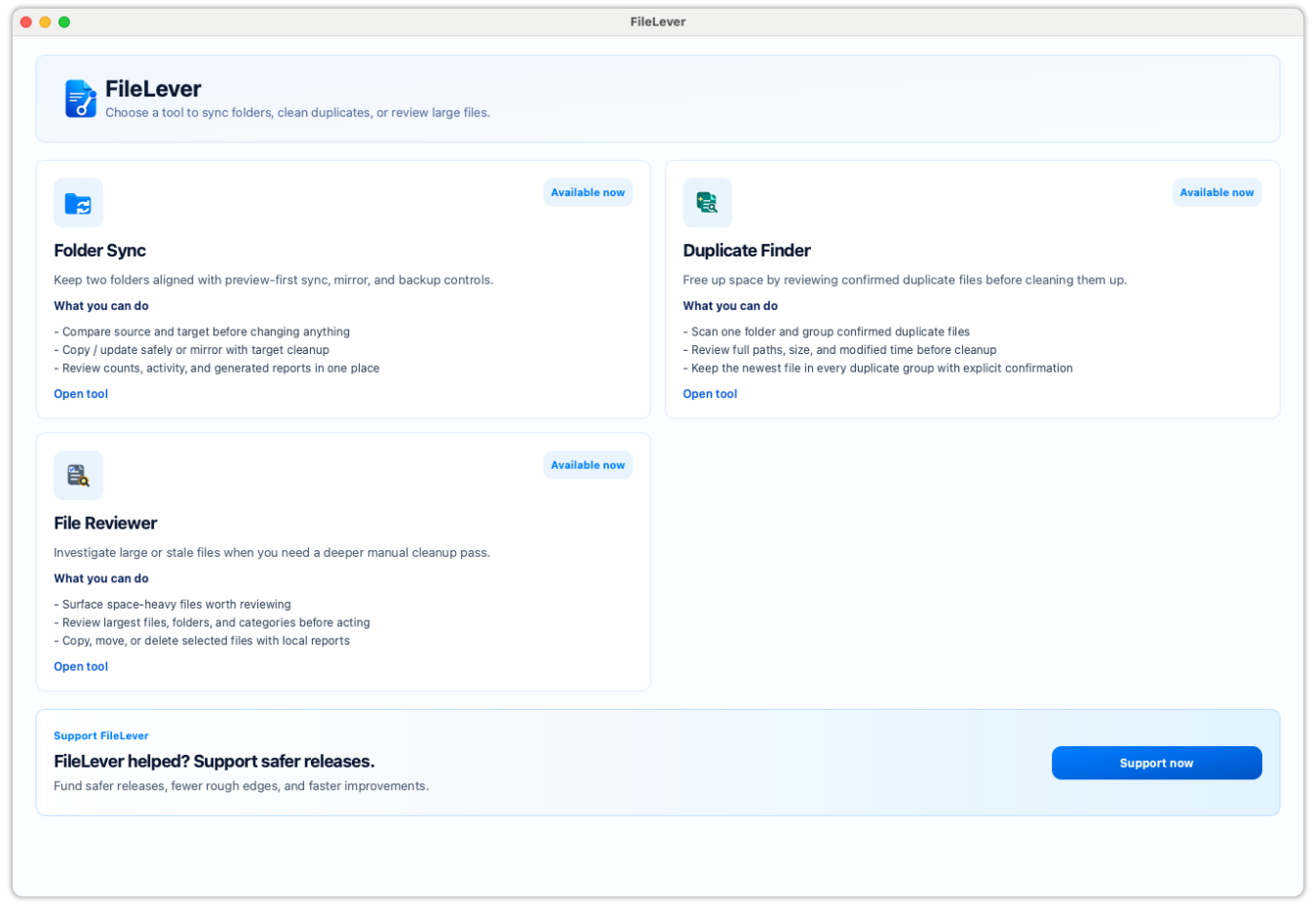
Drives fail. Folders get deleted. Backups fall behind. FileLever helps you protect the files you can’t replace. Keep backups in sync, preview every change before it runs, and clear extra files only when you’re ready.
Drives fail, folders get wiped, and working folders disappear. Valuable memories and files need more than one home.
If the archive is not current, recovery fails when you need it. Sync and archival must keep the backup copies up to date.
Extra exports and forgotten large files fill disks—but clearing extras must never outrun a backup you trust.
Confirm your archive first. Then preview every move or delete before you free up space.
Keep your photos, projects, and important files protected with up to date backups. Preview changes before they happen, then free up space when you’re ready.
Your media is irreplaceable. Keep current copies across Mac folders, external drives, NAS, Dropbox, and locally synced Google Drive—then reclaim space only after the archive looks right.
Explore this feature
Archive older photos, videos, and edits from Apple Photos or iCloud Photos to a drive you choose. Review the plan, check the completed archive, and decide separately whether originals should move to Recently Deleted.
Explore this feature
Project folders and exports deserve a recoverable spare. Sync a trusted copy first, preview every update, then clean the working disk with confidence.
Explore this feature
GB and TB libraries need deliberate copies—not blind mirrors. Maintain current clones across drives, then remove only confirmed duplicate extras.
Explore this feature
PDFs, documents, and project files should survive a failed disk. Keep them current across local storage, NAS, Dropbox, and local Google Drive folders.
Explore this feature
Archive or move valuable data first, preview the destination update, then clear extras with exact de-dupe and large-file review—including move-to-archive when deletion is not the goal.
Explore this feature
Start with the job in front of you: sync a folder or backup, archive important files and photos, find exact duplicates, or review large files. FileLever shows the plan before it copies, updates, moves, or deletes anything—so you can keep recovery copies current before you free up space.
Pick local folders, HDD/SSD, USB, mounted NAS, Dropbox, or Google Drive folders already synced locally.
See what is new, changed, unchanged, or only on the target—so you know exactly how the backup will be updated.
Run incremental sync or archival with full control over what is copied, updated, or left alone.
After the copy is current, remove exact duplicates or review large files to delete or move into the archive—only with explicit confirmation.
Watch Folder Sync, Duplicate File Finder, Large File Reviewer, and Photo Archive in action—then see how FileLever keeps backups current and helps you review storage before you make a change.
Keep folders and backups current.
Choose a source and destination, preview new, changed, unchanged, and target-only files, then use Copy / Update or Mirror deliberately.
Find exact duplicates before you remove anything.
Set a minimum size, review each duplicate group and its paths, keep the copy you need, then remove confirmed extras.
See what is consuming your storage.
Review videos, archives, installers, and old exports individually, then keep, archive, or remove them deliberately.
Protect years of photos, videos, and edits before you free up iCloud or Mac storage.
Choose older media, preview the archive, copy it to a local or external drive, and check that each item finished before an optional, separately confirmed move to Recently Deleted.
See the plan before anything changes.
Transparent previews for sync, archival, de-dupe, and large-file actions keep recovery copies safe while you free the working disk.
Practical Mac workflows for keeping media and files protected across drives and cloud-backed folders—then clearing extras without guessing.
Task-led guides for the jobs people usually search before they download a tool.
Practical posts for sync, backup, cleanup, and comparison workflows.
Feature pages and docs that explain what FileLever does before you commit to a workflow.
FileLever is preview-first on purpose: you see how sync, archival, and backup updates will apply before they run. That control is what makes clearing extras feel safe—because the valuable copy already exists somewhere you chose.
FileLever works on your Mac with local folders, HDD/SSD, USB, mounted NAS, and Google Drive folders that Google Drive for desktop has put on your Mac. For Dropbox, FileLever connects directly to the account you choose; your files do not pass through FileLever servers.
Start a second copy of what matters today. Keep backups in sync with a clear preview of every update—then clear exact duplicates and large files only when you are ready.
Support continued work on safer backup and sync, clearer archival guidance, faster scanning, Windows and Linux builds, and tools that help people protect valuable files before they clear extras.
Safer releases
Signing, notarization, and cleaner packaging for the current macOS release
Smooth setup
Better docs, smoother installs, faster fixes, and less friction after download
Fast progress
More time for duplicate review, smarter search, and the next useful workflows